
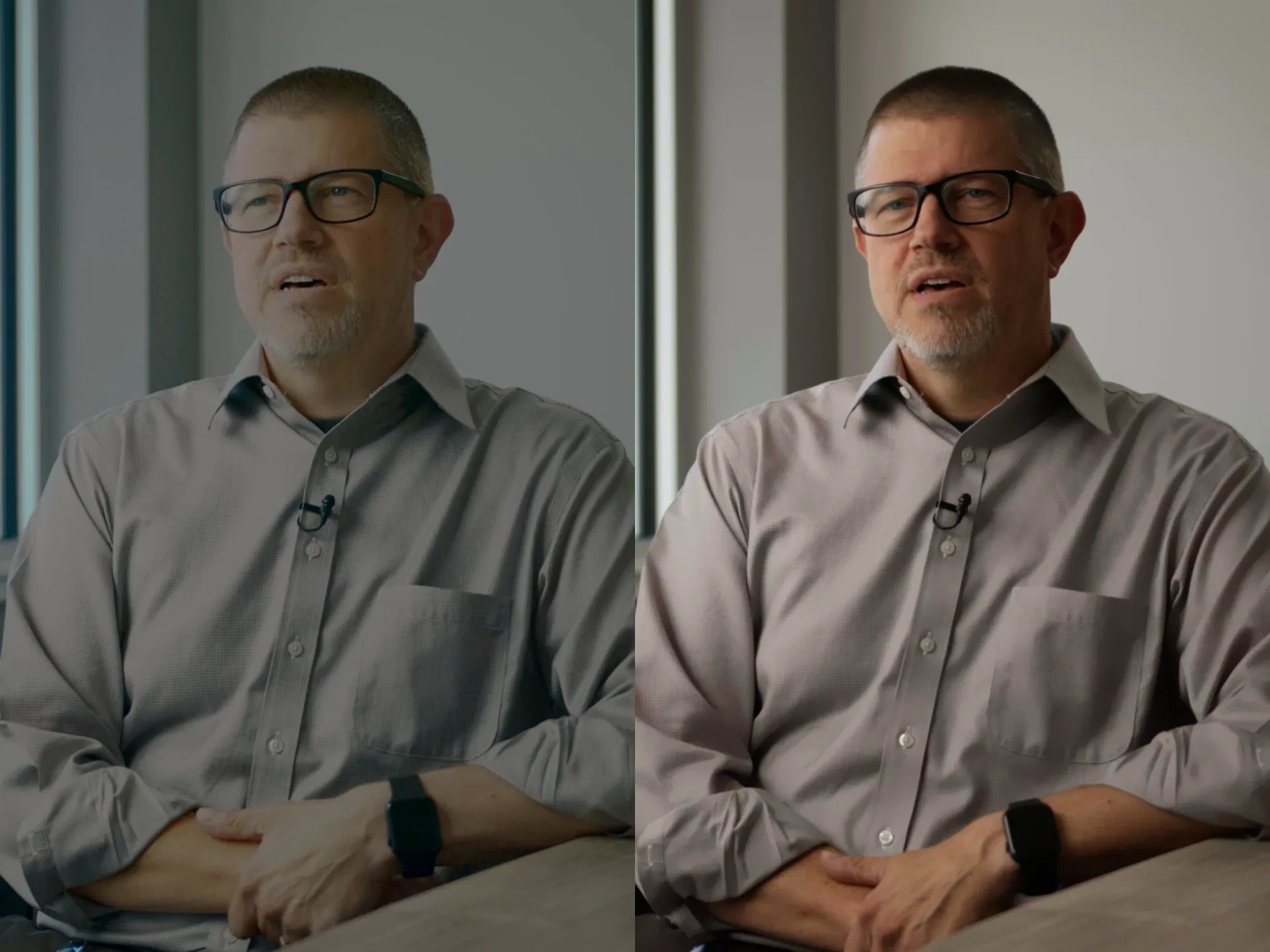
When everyone thinks the footage is fine
A few months ago, I joined an ongoing commercial production for a technology company. Another video editor had already cut and graded the flagship executive interview, handing off what they called a completed master. Here was the surprising part: nobody on the client side had complained. The marketing team was fine with it. The executives were fine with it. No one said a single word. In corporate video, clients often accept muddy, flat visuals simply because they assume that is just what an office looks like under commercial cameras. If no one shows them better, they have no reason to question it. I opened the project file in DaVinci Resolve Studio to see what was actually going on.
A massive node tree that missed the fundamentals
Most people assume bad corporate video happens when an editor gets lazy and slaps a generic conversion LUT onto raw log footage. That was not what happened here. The previous editor had clearly spent real time on the grade. They built a massive node tree packed with serial nodes, parallel mixers, and isolated qualifiers. You could see the genuine effort on the screen. They really tried. Yet despite all that complexity, the final image looked terrible. The basic color fundamentals were completely broken. The white office wall in the background had a murky cyan-green cast. The shadows in the window frame and chair were lifted into a milky, faded slate. Worst of all, the executive looked pale, washed out, and unwell.

Why complexity cannot fix a broken foundation
Stacking nodes in DaVinci Resolve does not make a grade professional. If your primary exposure and white balance are off at the root of the tree, every secondary adjustment down the line just compounds the error. Corporate offices are full of competing light sources: cool daylight through exterior windows, warm table lamps, and overhead commercial fixtures. When you start pulling keys and adjusting saturation before neutralizing those base casts, your qualifiers grab dirty color data. The green wash on the walls bleeds right into the subject's skin. Human eyes are tuned to notice faces before anything else. We look at people all day long. When an executive's skin tone has an unnatural green tint, viewers register an immediate subconscious disconnect. They might not know what a vectorscope or a node tree is, but the image feels amateur and untrustworthy.
The proof was in the pudding
I did not argue with the team or deliver a speech about color theory. Talking about bad grades rarely convinces anyone who already signed off on an edit. Instead, I rebuilt the grade from scratch on my own. I set up a disciplined color management pipeline. I neutralized the background drywall so white was actually white. I isolated the executive's skin on a clean secondary node to restore natural peach warmth and healthy blood tone. I pinned true black levels on the glasses frame, Apple watch, and microphone to create clean three-dimensional depth. Finally, I restored natural emerald saturation to the office plant on the right. Then I put the two grades side by side and showed the president of the company. There was no debate. He took one look at the comparison and saw how awful the first grade was in comparison. He asked why they had ever accepted it, and immediately had me re-grade every single interview in the library. The proof was in the pudding.

What buyers actually respond to
Enterprise buyers, investors, and board members will never ask about camera sensors, bitrates, or node structures. But they feel the difference within three seconds of playback. When an interview has muddy colors, flat contrast, and sickly skin tones, it reads like an internal webcam check-in. When the grade is clean, contrast is intentional, and the subject looks confident and healthy, it commands authority. True post-production quality is not about making node trees complicated to prove you worked hard. It is about having the precision to get the image right so the final film stands on its own.