How Does Basecamp Work? Calm Asynchronous Cycles
This film for Basecamp features a male presenter demonstrating how the project management software simplifies team collaboration. The creative treatment uses screen recordings and a picture-in-picture presentation style to visually explain each feature, effectively communicating Basecamp's promise of calm, asynchronous cycles.

At 0:22, a medium close-up shot shows a man with short brown hair and a beard, wearing a light green t-shirt, seated at a wooden desk. He is looking towards a white computer monitor to his left, with his hands positioned over a white keyboard. The camera is positioned slightly to his right, showing part of a white wall with framed art and a corkboard behind him.
This moment establishes the presenter as the central subject and introduces the setting, a typical work environment where the problem of inefficient project management often arises, setting the stage for Basecamp's solution.
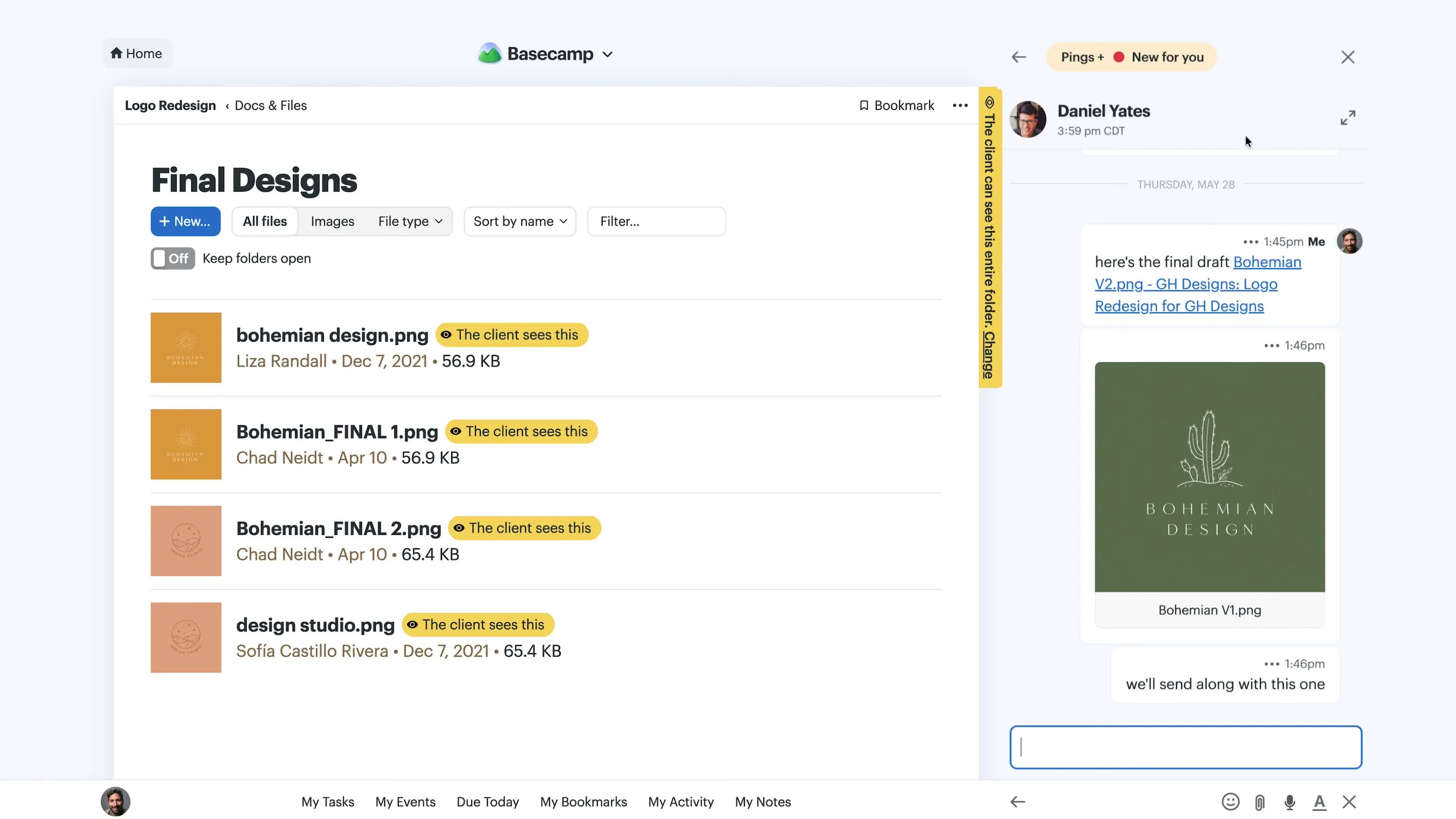
At 1:35, the screen displays the Basecamp web interface. On the left, a 'Docs & Files' section under 'Logo Redesign' shows a list of '.png' image files like 'bohemian design.png' and 'Bohemian_FINAL_1.png'. To the right, a 'Pings + Notifications' chat window is open, showing a conversation with 'Daniel Yates' at 3:59 pm CDT, discussing a 'final draft' of a 'bohemian design'. The overall interface is clean, with prominent 'Home' and 'Basecamp' branding at the top.
This moment directly demonstrates a core feature of Basecamp, the integrated 'Docs & Files' and 'Pings' for communication, showcasing how the platform streamlines the review and feedback process for design projects, which is central to its asynchronous workflow treatment.
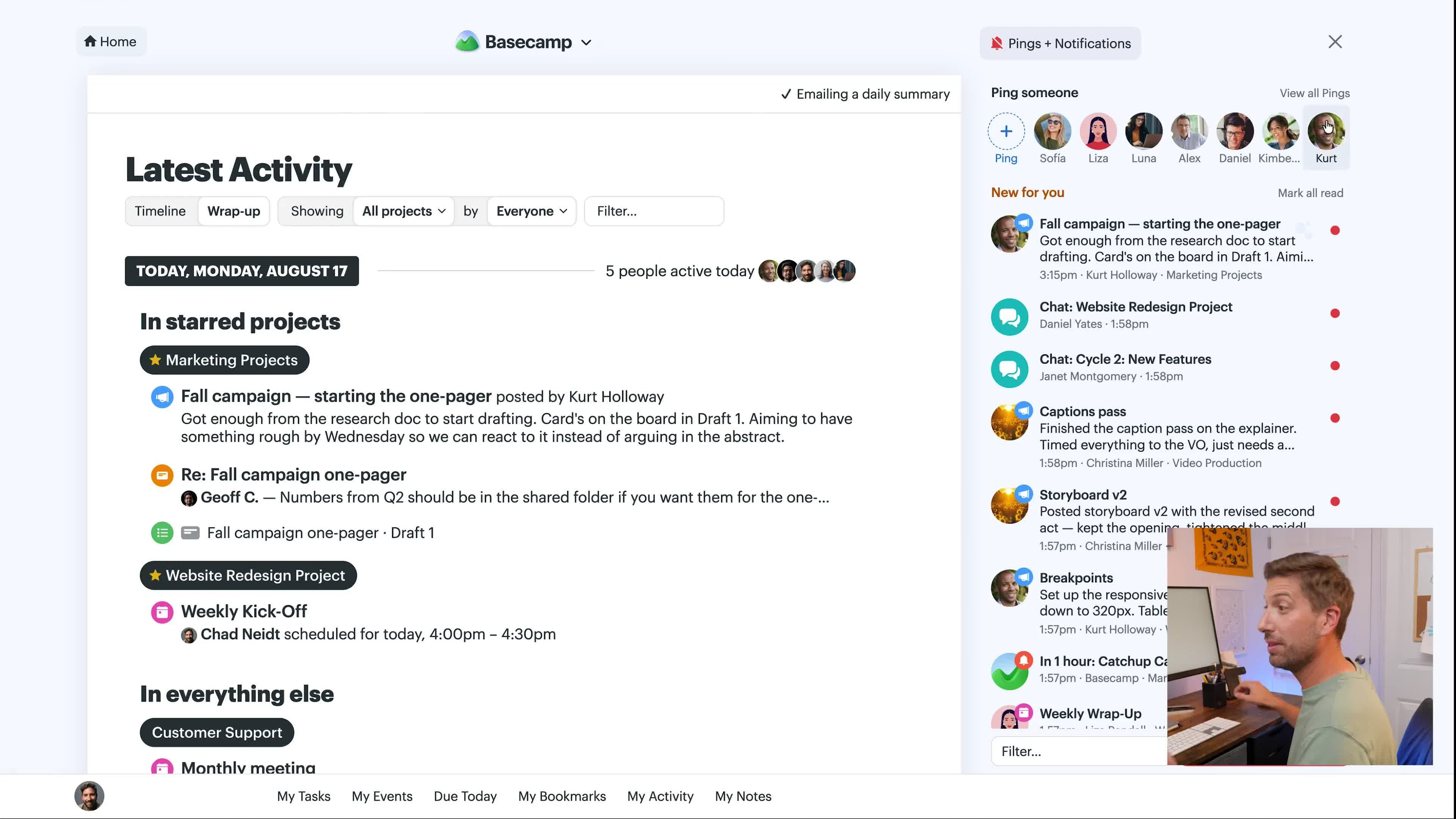
At 3:02, the screen shows the Basecamp 'Latest Activity' dashboard on the left, displaying 'TODAY, MONDAY, AUGUST 17' with '5 people active today', followed by 'In starred projects' and 'In everything else', listing various project updates and meetings. On the bottom right of the screen, a small picture-in-picture video shows the presenter from the earlier frames, gesturing as he talks. The 'Basecamp' logo is visible at the top center.
This moment connects the narrative promise of streamlined project management to the final brand takeaway by showing the aggregated 'Latest Activity' dashboard, reinforcing how Basecamp provides a comprehensive overview of all project progress and communications, delivering on its promise of 'calm asynchronous cycles' and efficient collaboration.
Selected frames, transcript, motion, and sound. Source & coverage below.
An approach to borrow.
This film structure is useful for creative directors or strategists when a product's core value lies in simplifying complex processes through its user interface. It excels at demonstrating software features visually and systematically, especially when coupled with a clear, direct voiceover, making it ideal for tutorials or feature-focused advertisements. The picture-in-picture format allows for human connection while maintaining focus on the product itself.
The inquiry moments effectively connect the subject to the treatment and payoff. The initial frame establishes the presenter and the context of project management, the treatment frame demonstrates Basecamp's specific features in action (like file sharing and chat), and the connection frame consolidates these benefits into an overarching view of project activity, delivering on the promise of simplified collaboration. However, the transcript does not align with the visual and brand demonstration in the latter half of the film.
Study notes & sources
How the film develops
Opening
The film opens with a direct address from a presenter, quickly introducing Basecamp's simplicity and project-centric nature, setting the stage for a brief tutorial.
Development
The middle section systematically demonstrates various Basecamp features like creating projects, message boards, to-dos, docs & files, and chat rooms, using a clear picture-in-picture format with UI navigation.
Payoff
The film concludes by presenting the 'Latest Activity' dashboard, summarizing how Basecamp centralizes and simplifies project management, fulfilling its promise of 'calm asynchronous cycles' while the presenter nods and gestures in the inset.
Speech, sound & motion notes
The audio track primarily features a male voiceover providing clear, instructional narration. There is no background music or specific sound effects, maintaining a clean and focused presentation suitable for a software demonstration. The transcript contains significant irrelevant dialogue in the middle and end of the windows, indicating the audio doesn't fully align with the visual content of the advertisement for Basecamp.
Interpretation limits
This film for Basecamp features a male presenter demonstrating how the project management software simplifies team collaboration. The creative treatment uses screen recordings and a picture-in-picture presentation style to visually explain each feature, effectively communicating Basecamp's promise of calm, asynchronous cycles. Algorithmic 10fps motion telemetry and 16-bit PCM acoustic metrics measure cut frequency, optical movement, and loudness dynamics, but do not replace human continuous-playback viewing or independent sound-mix listening, nor do they establish commercial ROI or audience conversion outcomes.
Bring your own brief.
Discuss the choices that could serve your project.